Chama Meeting Agenda 1/22/2024
Run Statistics
Creating fake Runs to optimize to look into how long the Optimization will take. This only tests the Chama optimization.
Notes from looking at results.
- My current ram test is not the best way measure how much memory this is taking.
- The detection time is the longest part of the process. This accounts for the majority of the time everything else is being done in a few seconds this takes minutes.
- Time it takes to fully run
- 1 signal 223 seconds = 3 min 43 seconds
- 2 signal 196 seconds = 3 min 16 seconds
- 10 signals 160 seconds = 2 min 40 seconds
- 100 signals 460 seconds = 7 min 40 seconds
Test 1. One Signal
Scenario Undetected Impact Probability
0 Banklick_Plume_1 2678400 1.0
Create Chama Run
Time Length - 0:00:00.102519
Current RAM Usage: 19435.37 MB
Signals
Time Length - 0:00:00.076810s
Current RAM Usage: 19435.72 MB
Sensors
Time Length - 0:00:00.014996
Current RAM Usage: 19434.80 MB
Create a dataframe that is [895 rows x 3 columns]
Detection Times
Time Length - 0:03:36.815238
Current RAM Usage: 20504.57 MB
Detection Time Statistics:
Create a dataframe that is [895 rows x 7 columns]
0:00:00.235320
Current RAM Usage: 20505.54 MB
Minimum Detection Times
0:00:00.079677
Current RAM Usage: 20506.06 MB
Backend TkAgg is interactive backend. Turning interactive mode on.
impact
0:00:06.350192
Current RAM Usage: 20789.14 MB
{'Solved': True, 'Objective': 3363.0, 'Sensors': ['019.01.0811'], 'FractionDetected': 1.0, 'TotalSensorCost': 1.0, 'Assessment': Scenario Sensor Impact 0 Banklick_Plume_1 019.01.0811 3363} ['019.01.0811']
Done! Minutes: 3.7287062883377073 Seconds: 223.72237730026245 Millis: 223722
Test 2. Two Signals
Create Chama Run 2023-12-19 13:30:53.260246 0:00:00.102666 Current RAM Usage: 20135.47 MB
Signals dataframe [37000 rows x 4 columns] Signals 0:00:00.049442 Current RAM Usage: 20135.48 MB
Sensors 0:00:00.013616 Current RAM Usage: 20134.32 MB
Detection Times data frame : [1790 rows x 3 columns] Detection Times 0:03:13.982519 Current RAM Usage: 21178.74 MB
Detection Time Statistics Dataframe: [1790 rows x 7 columns] Detection Stats 0:00:00.450435 Current RAM Usage: 21179.09 MB
Minimum Detection Times 0:00:00.091244 Current RAM Usage: 21178.82 MB
impact 0:00:01.294491 Current RAM Usage: 21193.15 MB {'Solved': True, 'Objective': 3363.0, 'Sensors': ['019.01.0837'], 'FractionDetected': 1.0, 'TotalSensorCost': 1.0, 'Assessment': Scenario Sensor Impact 0 Banklick_Plume_1 019.01.0837 3363 1 Banklick_Plume_2 019.01.0837 3363} ['019.01.0837']
Done! Minutes: 3.267210559050242 Seconds: 196.03263354301453 Millis: 196032
Test 3. Ten Signals
Create Chama Run 2023-12-19 14:09:32.113261 0:00:00.147776 Current RAM Usage: 20455.02 MB Signals Dataframe [37000 rows x 12 columns] Signals 0:00:00.056565 Current RAM Usage: 20454.55 MB Sensors 0:00:00.011001 Current RAM Usage: 20454.66 MB
Detection Times:[8950 rows x 3 columns] Detection Times 0:02:35.643131 Current RAM Usage: 21685.77 MB Detection Time Statistics:[8950 rows x 7 columns] Detection Stats 0:00:00.698934 Current RAM Usage: 21670.99 MB Minimum Detection Times: 0:00:00.122572 Current RAM Usage: 21663.36 MB impact 0:00:03.431584 Current RAM Usage: 21653.97 MB {'Solved': True, 'Objective': 3363.0000000000005, 'Sensors': ['019.01.0837'], 'FractionDetected': 1.0, 'TotalSensorCost': 1.0, 'Assessment': Scenario Sensor Impact 0 Banklick_Plume_1 019.01.0837 3363 1 Banklick_Plume_10 019.01.0837 3363 2 Banklick_Plume_2 019.01.0837 3363 3 Banklick_Plume_3 019.01.0837 3363 4 Banklick_Plume_4 019.01.0837 3363 5 Banklick_Plume_5 019.01.0837 3363 6 Banklick_Plume_6 019.01.0837 3363 7 Banklick_Plume_7 019.01.0837 3363 8 Banklick_Plume_8 019.01.0837 3363 9 Banklick_Plume_9 019.01.0837 3363} ['019.01.0837']
Done! Minutes: 2.6688427209854124 Seconds: 160.13056325912476 Millis: 160130
Test 4. One Hundard signal test
Create Chama Run 2023-12-19 14:57:21.642586 0:00:00.429051 Current RAM Usage: 20376.54 MB Signals Dataframe [37000 rows x 102 columns] Signals 0:00:00.155864 Current RAM Usage: 20386.85 MB Sensors 0:00:00.010316 Current RAM Usage: 20386.82 MB Detection Times: [89500 rows x 3 columns] Detection Times 0:06:29.475968 Current RAM Usage: 22214.17 MB Detection Time Statistics: [89500 rows x 7 columns] Detection Stats 0:00:08.119823 Current RAM Usage: 22237.59 MB Minimum Detection Times: 0:00:00.867446 Current RAM Usage: 22253.72 MB impact 0:01:01.497926 Current RAM Usage: 22188.70 MB {'Solved': True, 'Objective': 3363.0000000000073, 'Sensors': ['019.01.0837', '019.01.1087'], 'FractionDetected': 1.0, 'TotalSensorCost': 2.0, 'Assessment': Scenario Sensor Impact 0 Banklick_Plume_1 019.01.0837 3363 1 Banklick_Plume_10 019.01.0837 3363 2 Banklick_Plume_100 019.01.0837 3363 3 Banklick_Plume_11 019.01.0837 3363 4 Banklick_Plume_12 019.01.0837 3363 .. ... ... ... 95 Banklick_Plume_95 019.01.0837 3363 96 Banklick_Plume_96 019.01.0837 3363 97 Banklick_Plume_97 019.01.0837 3363 98 Banklick_Plume_98 019.01.0837 3363 99 Banklick_Plume_99 019.01.0837 3363
[100 rows x 3 columns]} ['019.01.0837', '019.01.1087']
Done! Minutes: 7.676393206914266 Seconds: 460.58359241485596 Millis: 460583
Rainfall Update
The Rainfall files need to be modified so that the rainfall that is around 2 days before the start time and 2 days after the end time within reason.
Rainfall files have been updated so that they are named the same as the folders. The data in these files has been adjusted to be 2 or so days before and after the rainfall events.
- Add the rainfall files onto sharepoint.
- QA on rainfall trimming process GUI run of big dat files and then small rainfall.
YAML Update
We are switching from Config to Yaml.
- We are currently reducing the amount of CSV files and we are streamlining the process. This is a good time to review the Config files.
- Modify config files that we are already using to YAML file.
- Talk with Jake about Folder Structure. (Combo and Multi)
ReadMe
- This should be an explanation of the Config/YAML file.
- The values should be explained on what they do. Run these explanations by Anne and Caleb.
- Make sure to put the Pico Curie explanation in the Read Me.
Add Storage Units, Dividers, and Outfalls to Junctions for possible sensor locations. Programmatically.
- The Possible sensors locations was done by hand. This will need to be generated Programmatically by Reading the INP file and Pulling the names of the objects in the Storage Units, Dividers, and Outfalls.
- Remember to get rid of the comments.
- What else goes into this file.
Other Tasks
- Code Cleanup.
- Jake was in the process of Streamlining the code.
- Structure Cleanup.
- Review new Flow diagram and write up a structure around the flow and the fact that we are no longer segregating the code the way we have in the past.
- Cleanup the Database.
- Review Database.
- Do we want a database.
Modified Flow Diagram
Config File
Current Status
Generate Input files
- rainfall_file:
  - 2011Aug07T05.dat
  - 2013Jul01T16.dat
- hot_start_file:
  - 2011Aug07T05.hsf
  - 2013Jul01T16.hsf
- standard_deviations:
  - x: 2500
    y: 833
- wind_direction_degree:
  - 0
  - 90
  - 180
  - 270
- contaminant_size_in_picocurie: 40000000000000
- inp_file: BanklickCreekDownstream_base.inp
- subcatchments_centers_file: subcatchments-centers-from-xy_only.csv
Generate Signal Files
multi_inp_files:
  enabled: True
  # The user should create a file directory containing the generated INP Files
  inp_path: "../inp_files/3_bank"
  # Give the output path a unique directory, such as an incrementing integer ID
  # For ease of understanding, consider using the same unique file directory
  # as defined in the INP Path,
  # i.e. ../inp_files/1 and ../generated_files/multi/1
  out_path: "../generated_files/multi/13_bank_2x"

single_inp_file:
  enabled: False
  inp_path: "../inp_files"
  inp_file: "BanklickCreekDownstream_full_model_calibrated_001_08282017_Plume2.inp"
  out_path: "../generated_files/single"
  # NOTE: Scenario name should be derived from the inp file, maybe? TO support multi
  # scenario_name: "Banklick_plume_18x"

static_input_path: "../static_input_files/Banklick/"
pollutant: "Cesium"
reporting_time_in_min: 5
sim_timestep_window_in_sec: 5
potential_sensor_locations_file: "potential_sensors_25_locations.csv"
Combine Signal Files
generated_path: "../generated_files/combined"
signals_dir: "FT_100"
# NOTE: The combiner should automatically append signals_dir in the out path
out_path: "../generated_files/combined"
out_file_name: "fake_combined_signal_file_test_100.csv"```

#### Run Chama

```yaml
static_inputs_dir: "../static_input_files"
generated_inputs_dir: "../generated_files/combined"
output_dir: "../runs"
generated_signal_folder: "FT_100"
model_name: "Banklick"
# scenario_file: "combined_scenario.csv"
scenario_file: "fake_combined_scenario_file_100.csv"
signal_csv: "fake_combined_signal_file_test_100.csv"
sensor_csv: "potential_sensors_all_locations.csv"
time_step: 1
start_step: 0
end_step: 10000
detector_threshold: 2
sensor_budget: 3
formulation: "impact"
opt_approach: "scenario-time"
database_dir: "database"
swmm_start_time: 1493443800
reporting_time: 300
Future Status
One yaml file
# Plume Generation
- standard_deviations:
  - x: 2500
    y: 833
- wind_direction_degree:
  - 0
  - 90
  - 180
  - 270
- contaminant_size_in_picocurie: 40000000000000
# Network File information
- inp_file: BanklickCreekDownstream_base.inp
- subcatchments_centers_file: subcatchments-centers-from-xy_only.csv
- rainfall_metadata_file: cvg_event_data.csv
- senor_objects:
  - Outfalls
  - Junctions
  - Dividers
  - Storage Units
- paths:
  - input: ____
  - inp_output: ____
  - rainfall_hotstart_input: ___
  - signal_output: ____

# INP file information
- pollutant: "Cesium"
- reporting_time_in_min: 5
- sim_timestep_window_in_sec: 5
- start_plume_objects: Subcatchments
- multi_inp_files:
  enabled: True
# Chama Optimization
model_name: "Banklick"
time_step: 1
start_step: 0
end_step: 10000
detector_threshold: 2
sensor_budget: 3
formulation: "impact"
opt_approach: "scenario-time"
database_dir: "database"
swmm_start_time: 1493443800
reporting_time: 300
Folder Structure
The old folder folder structure was complicated.
- Config - Contains the multiple config files.
- generate_sig_input_files
- combine_signal_files
- run_chama
- Generated Files - signal files both combined and single.
- combined
- files by date..
- multi
- single
- signals
- combined
- inp_files - All input files that we use. (None of these were generated)
- runs - Chama Runs folders below this level are auto incremented.
- static_input_files - Files that can be used in multiple chama runs.
- Banklick
- Example6_final
ISSUES with the above structure.
- The static Input files will be generated programmatically now.
- The INP file will be generated programmatically now. And instead of having 2 we are going to be having thousands. And our current storage will not handle that well.
- Generated Files is too broad a name. The subfolders are a little confusing as well.
- We will be combining all the config files into 1 as shown in the section above and so dividing is not something we really want.
- We will need some place to store input files.
New folder Structure
- config.yml (this is where the user configures an ensemble)
- network_inputs/ (these files wouldn't normally be modified by a user)
- rainfall.dat & hotstart.hsf
- base_inp.inp
- Rainfall_metadata.csv
- centroid.csv
- ensemble_runs/
- ensemble_id/
- copy_of_config.yml OR README.txt or both?
- PROBABLY NOT - copy_of_network_inputs/ (in case the user has modified them, i.e. changed the network)
- generated_inp_files/
- signals/
- individual_signal_files/
- signal_1.csv
- signal_2.csv
- signal_3.csv
- signal_4.csv
- signal_5.csv
- combined_signals/ (probably only one file, but might need broken up if performance issues/runs too big)
- combined_1.csv
- individual_signal_files/
- output/
- ensemble_id/
Database
Older Database documentation
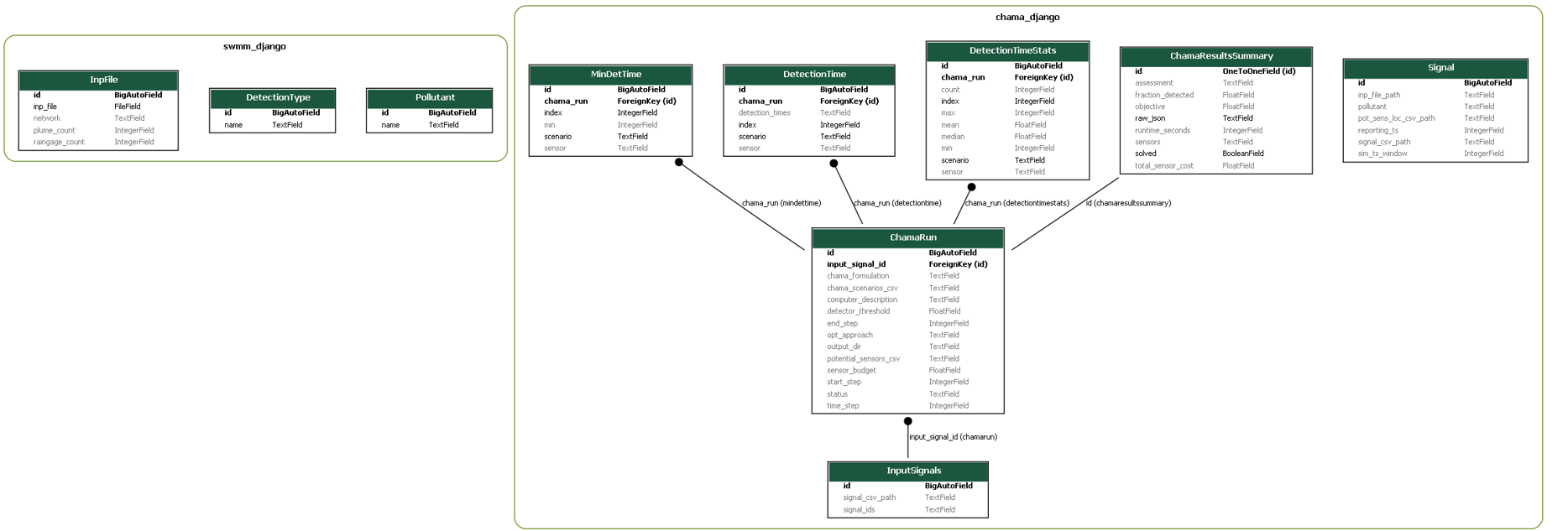
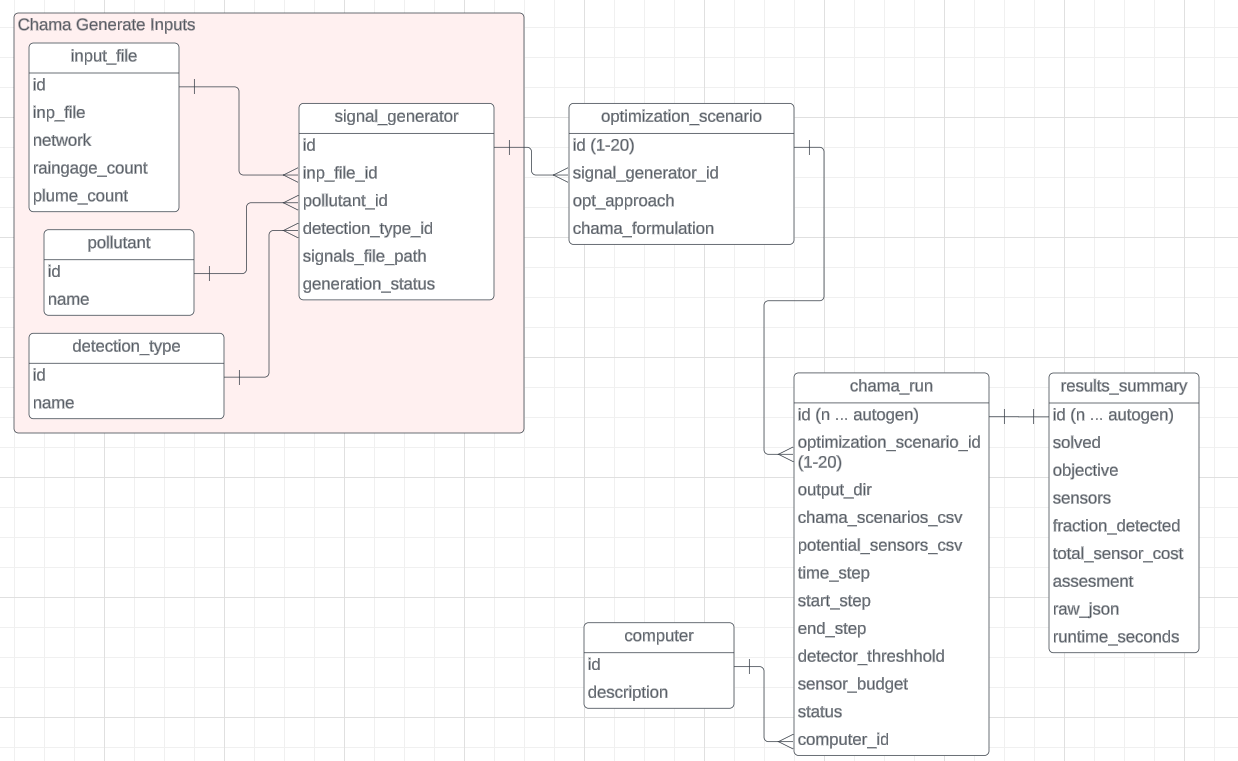
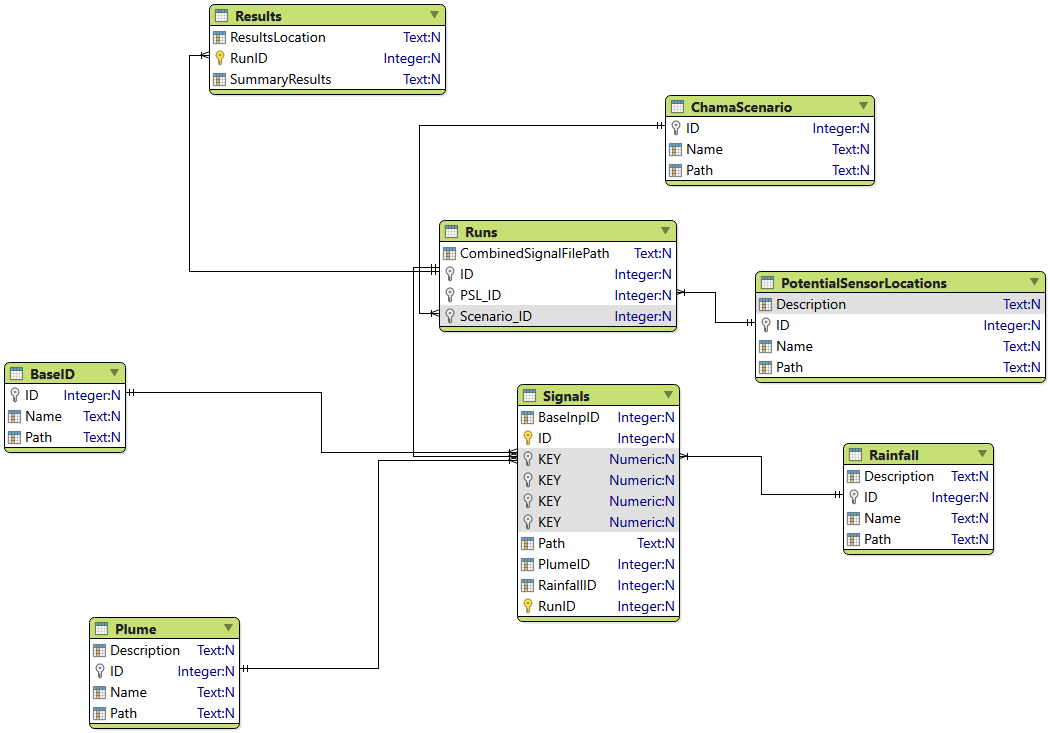
Valentina Chama ERD Current ERD
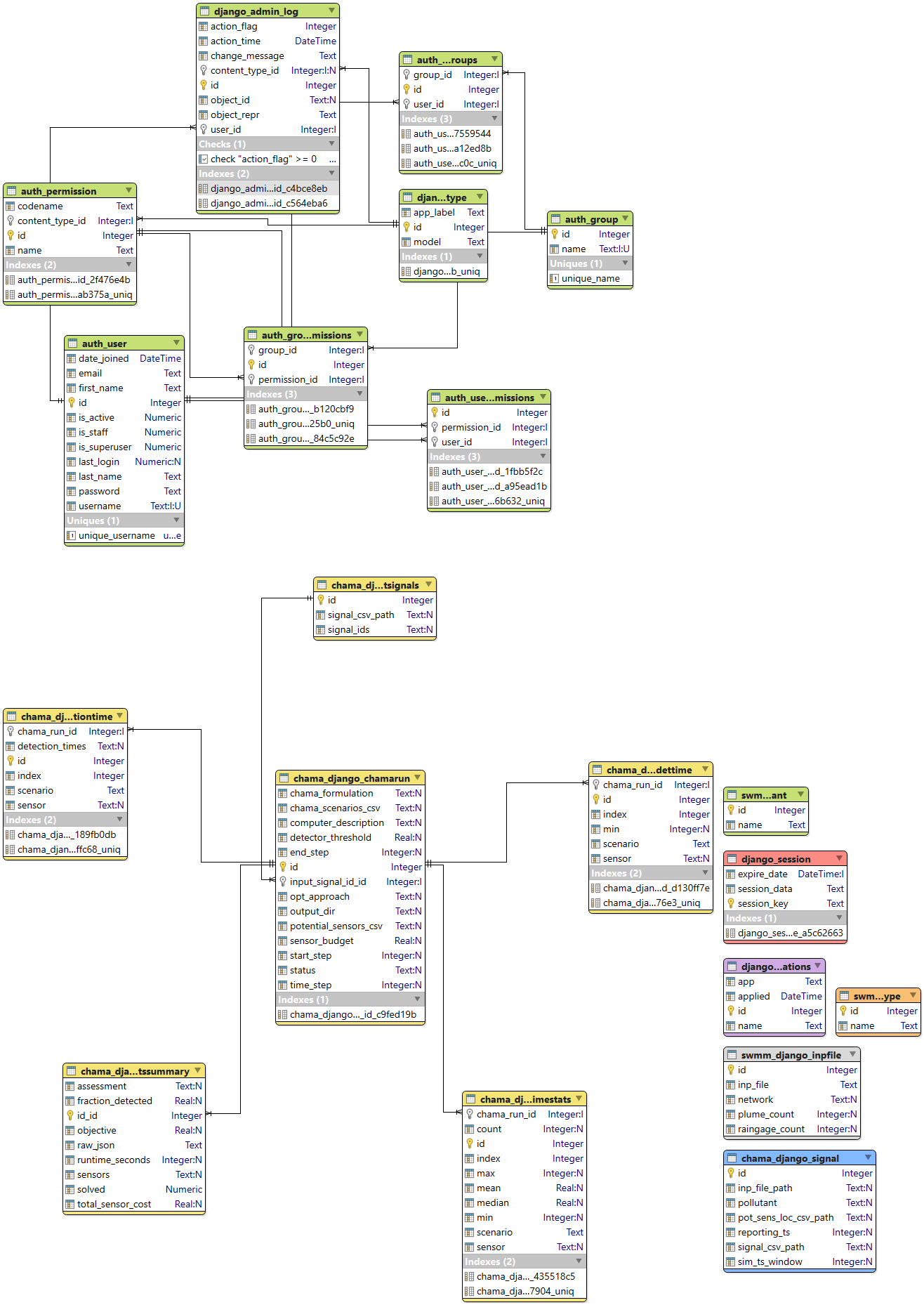
Where should we go from here?
We will need 4 tables with Ensemble Output. Three of them are the current csv data even if we do not use CSV for them anymore One is the general information that gets printed out on the screen currently.
- Detection Time Stats
- Detection Times
- min detection times
- Summary Results
Note These tables can change depending on what you choose in chama. We are currently using impact but I think I will have to check that there are other possibilities if we use something else We may want to handle that. Make a DB with all of the possible tables and have a message imputed if there is nothing for that specific table.
We will need 1 table with the inputs.
- this will include everything in the config file.
Some kind of chama runs table...
We should be able to remove the input signals. We will need to carefully remove this but it does need to be removed as it is not sustainable.
Same with signal it needs to be carefully removed.
- Make sure that what is being documented here is in the config file. I think it is but double check.
- Also bring up how we have hardwired Cesium into the code at some point (pico-curie)
- The three SWMM tables have no information in them.
- check that we are not still using them somewhere. Otherwise get rid of the tables.